Navigation systems are not only about calculating the distance from one point to another. It is also important that they check which type of vehicle is used and what kind of surroundings it will face. To move on water, ships must have waterway maps that show safe places to travel.
Airplanes have to follow certain paths that are made to keep them on the correct route and away from dangerous spots. Trucks need to consider their own weight, size, and the road limits they can move on.
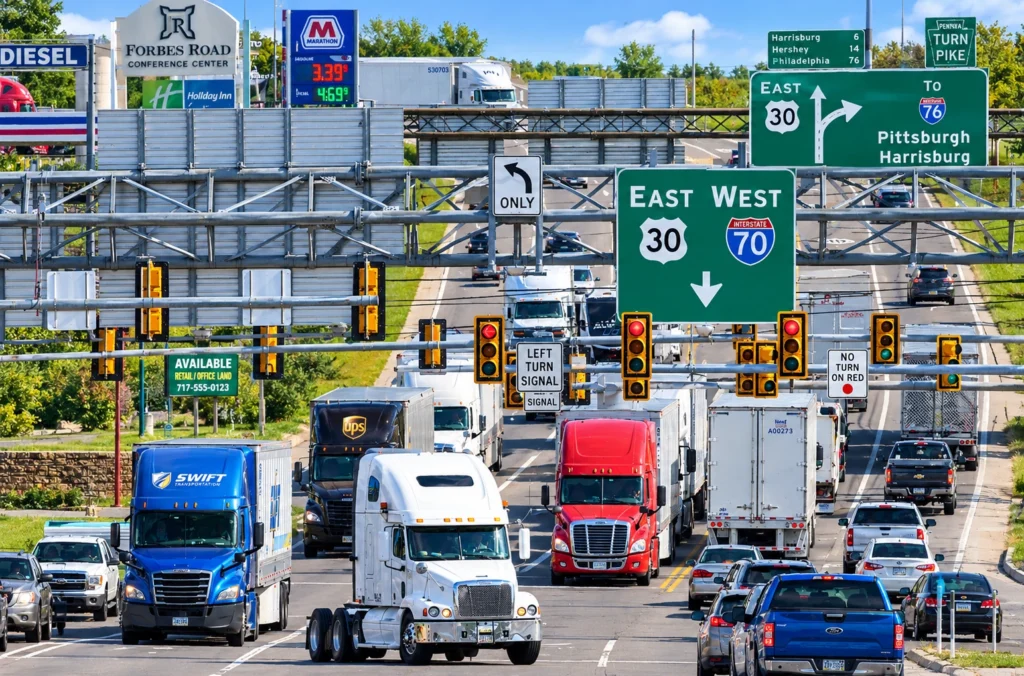
When it comes to boats and airplanes, special navigation tools have been normal for several years now. However, many truckers still mostly use typical apps like Google Maps and Waze, which are created basically for usual cars.
If other types of transport have personalized navigation, why shouldn’t trucks be different?
Why Ships and Aircraft Need Specialized Navigation
Ships do not travel exactly in simple straight lines when going between two ports. They must use navigable waters and also need to think about the nautical charts or dangers possibly present. For this, mariners rely on electronic navigation technology that supports planning and monitoring their trips, considering waterway conditions and what may not be allowed.
For an aircraft, there are other kinds of limits. Their navigation tools help with making flight plans, setting routes, and procedures that match how airplanes work and what airspace rules require. These flight systems are made specifically for flying and not only for quick travel between places.
Commercial trucks have their operational factors too. Roads that work for cars may not be okay for large trucks because of length of the truck, allowed weights, or banned commercial vehicles. Navigation without these points could send drivers to wrong roads.
The underlying principle is the same across all three industries: navigation should reflect the vehicle’s capabilities and the environment in which it operates.
Is Google Maps Good for Truck Drivers?
Google Maps is good for most navigation you need every day. It gives turn-by-turn directions and traffic info plus business locations are easy to find. But commercial truck routing is not fully covered because drivers cannot set their truck size or plan routes with certain truck-only restrictions in mind.
Waze helps a lot with traffic updates, and you can see reports from other drivers, but it also does not have a profile for commercial trucks. These apps are missing the ability for drivers to use dimension-based routing that is usually required for truck professionals.
Using both apps, drivers can find places and learn about traffic. Yet, the main problem is that a route meant for a regular car can sometimes not work for trucks. Vehicle sizes, road bans, and weight rules can change which route will actually be fine for specific vehicles.
| Navigation capability | Google Maps | Waze | Trucker Guide |
| General navigation and traffic information | Yes | Yes | Yes |
| Dedicated commercial truck routing | No dedicated truck-routing profile | No dedicated truck-routing profile | Truck-specific routing |
| Configuration of truck dimensions and weight limits | No complete truck profile | No complete truck profile | Available |
| Multiple route options | General route alternatives | Alternatives influenced by traffic and routing | Up to three route options |
| Additional guidance at highway junctions | General navigation guidance | General navigation guidance | Lane Assistance and Junction View |
| Seasonal-closure setting for trip planning | No dedicated truck-specific setting | No dedicated truck-specific setting | Available |
The main difference is not that general navigation apps are useless for those who drive trucks for their jobs. What is different is that these programs will not provide exactly the specialized truck-route methods. The functions and details of roads can change between versions or places, so drivers must always check the limits and pay attention to signs posted.
What Purpose-Built Navigation Looks Like for Trucks
For commercial vehicles, the first step in specialized routing is the vehicle itself. The height, width, length, and weight of your vehicle may determine what roads you can use, and the routing system tailored for passenger vehicles might not give you all the information you need to navigate.
Trucker Guide solves this by letting you set your truck’s dimensions and weight limits to route for trucks. The app is built to take into account any restrictions that may apply to a commercial vehicle. And it’s not just about considering every vehicle the same and able to use the same roads.
You need to be able to support the driver along the route. Trucker Guide can assist with lane assist and junction view in addition to the route to help the driver anticipate things like highway exits or junctions. And you can set seasonal closures for route planning purposes for roads that may be limited in some way by a seasonal change.
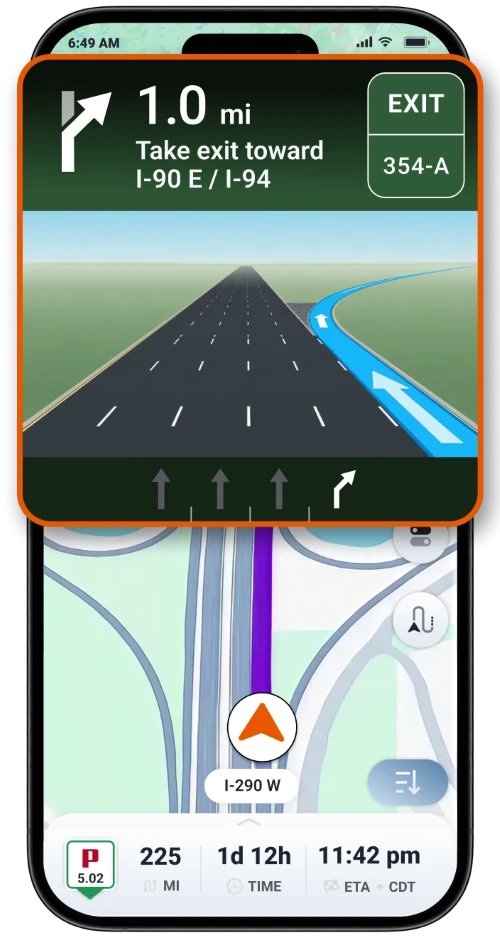
All of these are part of the idea of specialized navigation in that you want to consider the needs of the vehicle and the conditions that impact your travel. It is not meant to replace the signs, the official restrictions, or the judgment of the driver, but there can be information that is more suited to the operation of a commercial truck.
Why Route Suitability Matters More Than Distance Alone
For a passenger car, you can base your route selection primarily on the time, traffic, and distance. In a commercial vehicle, you also have to consider all that, but then also consider if the road is correct for your truck. If you have a shorter route, there can be restrictions that require you to take a different route. Perhaps the road you can take is good for a smaller vehicle, but not a taller or heavier vehicle.
Or perhaps you can take the road, but in the complex interchanges, you need to plan well ahead for your turns and lane changes. This is all a part of planning your trip and, hence, why specific vehicle routing is good. You need to have information to help you determine the suitability of the route before you go. You need information to help you confidently drive along.
No amount of purpose-built navigation is going to completely eliminate all the road dangers or ensure that every suggestion you get will be appropriate under all conditions. You still have the road signs. You still have the temporary restrictions. You have the changing conditions. You need official guidance. The beauty of specialized routing is that it helps you account for more of the factors that apply to your vehicle.
What Apps Are Better Than Google Maps for Trucks?
Google Maps and Waze remain useful tools for everyday navigation and traffic information. However, professional drivers should consider whether a navigation app accounts for their vehicle’s requirements, not just whether it can guide them between two addresses.
A GPS app built for trucks can offer capabilities that general-purpose navigation does not fully provide. Trucker Guide combines truck-specific routing with configurable vehicle dimensions and weight limits, live traffic cameras, multiple route options, and additional guidance at highway junctions.
The comparison reflects a broader principle across transportation. Ships and aircraft use navigation systems designed around their operating environments because route suitability depends on more than distance. Commercial trucks face their own physical and regulatory constraints, and their navigation systems should reflect those differences.
For truck drivers, choosing purpose-built navigation is part of planning a suitable journey. General-purpose apps can still help with traffic and destinations, but specialized truck navigation is designed to address the additional requirements of operating a commercial vehicle.